Student Progress Reports

Student Progress Reports, Generated From the Data You Already Have

A good progress report is more than a grade — it's a clear picture of where a student stands and what's next. Here's what belongs in one, and how ClassLedger generates it in minutes instead of an evening.

Start Free See a Sample Report

What Goes Into a Good Progress Report

Academic Performance

What the student knows and can do right now — not just a single test score.

Engagement & Behavior

How the student participates and follows through, which shapes how far the academic score alone can be trusted.

Growth Since the Last Evaluation

A number in isolation doesn't tell a family much — what changed, and in which direction, is what makes a report useful.

A Specific Next Step

Not "keep working hard" — a concrete thing to practice, and what success on it looks like.
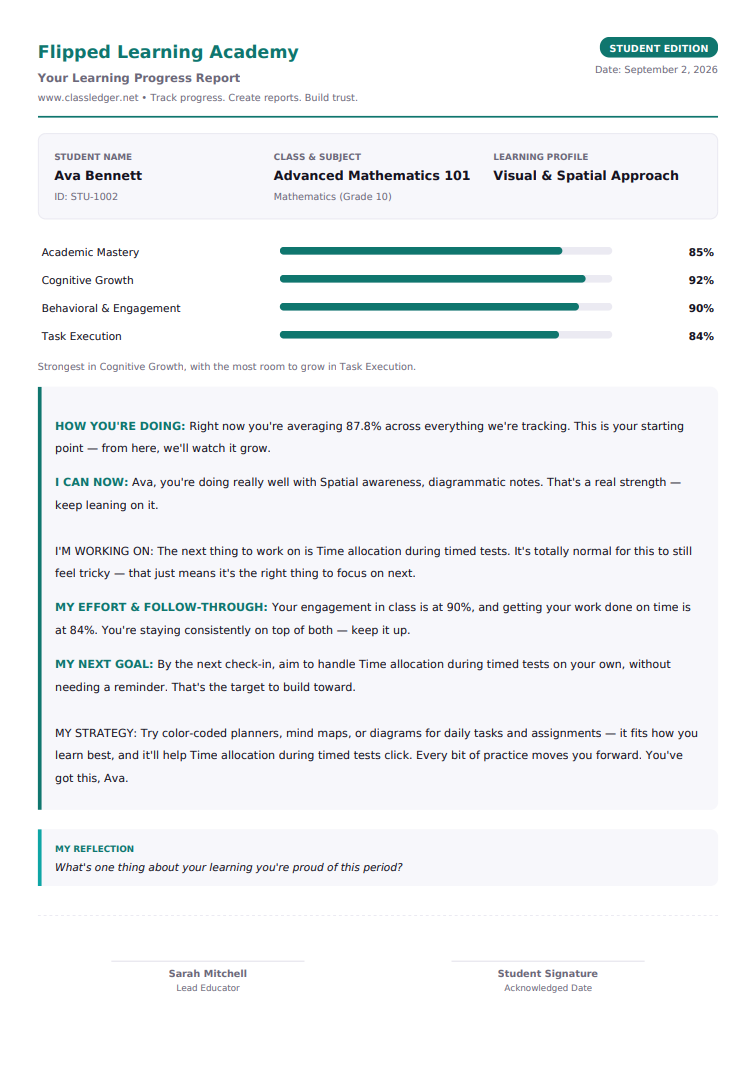
Real ClassLedger progress report in Student Edition, written directly to the student with a next goal and a self-reflection prompt

An actual generated report — Student Edition

How ClassLedger Generates One Automatically

Four steps — the same steps you already follow, just faster.

1. Record

Enter the four evaluation vectors — academic, cognitive growth, engagement, task execution.

2. Draft

AI drafts a narrative comparing the new scores against the student's last evaluation.

3. Review

Edit any line directly in the report before saving — nothing goes out unreviewed.

Frequently Asked Questions

What should a student progress report include?
A useful progress report covers academic performance, how the student engages and behaves in class, growth compared to the last evaluation, and a specific next step — not just a single letter grade.
How often should student progress reports go out?
There's no single rule — many teachers and tutors send them at natural checkpoints (end of a unit, end of a grading period, or after a stretch of tutoring sessions) rather than on a rigid fixed schedule.
Can student progress reports be generated automatically?
Yes. ClassLedger drafts a narrative report from the scores and notes an educator enters, comparing them against the student's last evaluation. The educator reviews and edits the draft before it's saved or shared — the AI drafts, it doesn't decide.

Want the AI angle specifically? See AI Progress Report Generation. Writing one yourself first? See Resources & Templates.

Generate Your First Progress Report

Free to start — no credit card required.

Start Free