Student Progress Reports

Student Progress Reports, Generated From the Data You Already Have

A good progress report is more than a grade. It's a clear picture of where a student stands and what's next. Here's what belongs in one, and how ClassLedger generates it in minutes instead of an evening.

Start Free See a Sample Report

What Goes Into a Good Progress Report

Academic Performance

What the student knows and can do, beyond a single test score.

Engagement & Behavior

How the student participates and follows through, which shapes how far the academic score alone can be trusted.

Growth Since the Last Evaluation

A number in isolation doesn't tell a family much: what changed, and in which direction, is what makes a report useful.

A Specific Next Step

Not "keep working hard", a concrete thing to practice, and what success on it looks like.
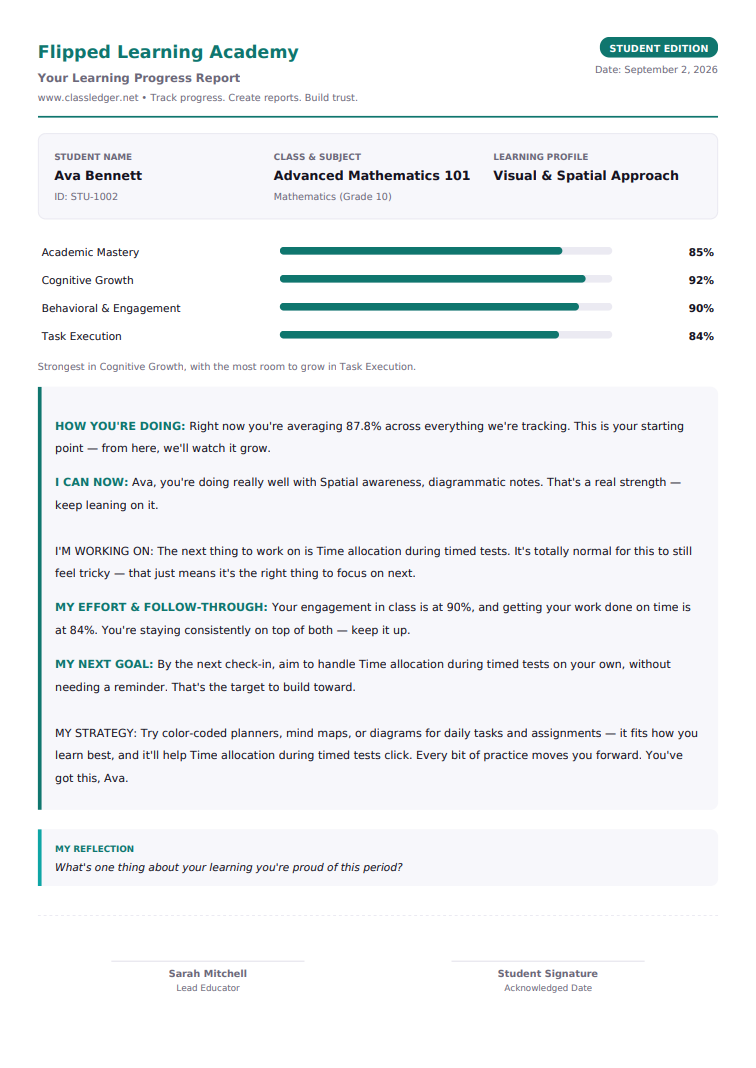
Real ClassLedger progress report in Student Edition, written directly to the student with a next goal and a self-reflection prompt

An actual generated report, Student Edition

How ClassLedger Generates One Automatically

Four steps: the same steps you already follow, just faster.

1. Record

Enter the four evaluation vectors: academic, cognitive growth, engagement, task execution.

2. Draft

ClassLedger drafts a narrative comparing the new scores against the student's last evaluation.

3. Review

Edit any line directly in the report before saving. Nothing goes out unreviewed.

Frequently Asked Questions

What should a student progress report include?
A useful progress report covers academic performance, how the student engages and behaves in class, growth compared to the last evaluation, and a specific next step.
How often should student progress reports go out?
There's no single rule: many teachers and tutors send them at natural checkpoints (end of a unit, end of a grading period, or after a stretch of tutoring sessions) rather than on a rigid fixed schedule.
Can student progress reports be generated automatically?
Yes. ClassLedger drafts a narrative report from the scores and notes an educator enters, comparing them against the student's last evaluation. The educator reviews and edits the draft before it's saved or shared. The drafting never decides a grade.

Want the drafting angle specifically? See ClassLedger Smart Progress Report Drafting. Writing one yourself first? See Resources & Templates.

Generate Your First Progress Report

Free to start: no credit card required.

Start Free